


How to Roll Back / Downgrade MIUI 10 to MIUI 9 on Any Xiaomi Phone
“How to Roll Back MIUI 10 to MIUI 9 or How to Downgrade MIUI 10 to MIUI 9”. Recently Xiaomi released the MIUI 10 for the some of the Xiaomi Phones and most of the users already updated their phone with the MIUI 10 Global update. MIUI 10 is the latest OS from the Xiaomi and comes with lots of new feature like full-screen gestures, new UI, New Sounds, new Camera features and lots more. And in coming months all the new Xiaomi phone comes with this new MIUI 10 update. But most of the Xiaomi users are not happy with the MIUI 10 performance and they want to go back to the MIUI 9 version or you can say that they want to Downgrade MIUI 10 to MIUI 9.
The reason that they want to go back to the previous version MIUI 9 that some of them are not getting the good battery, some are not happy with the camera performance. So today here in this guide we will explain to you how to that in the simple and easy way. This guide will work on Any Xiaomi phone. Below we are posting two different methods. One is the recovery method and second one id the fastboot method. Both the method will work on any Xiaomi phone and help you to Downgrade MIUI 10 to MIUI 9.

Table of Contents [show]
How to Downgrade MIUI 10 to MIUI 9
This is the official method and didn’t void the warranty of your phone. Read all the steps very carefully and follow all the instruction one by one on your phone. And before following this method to take the full backup of your phone. This process will wipe all the data from your phone, sobackup is recommended.
This guide will work on every Xiaomi mobile no matter which is Redmi note 5 Pro, Redmi Note 4, Redmi 3s/Prime, Redmi 4, Redmi 4a, Redmi Note 4G, Redmi y2, Mi 5, Mi Mix 2, Mi 4i, Mi 5, Mi 6, Mi Max, Max 2 etc.
In this guide, we are using our Redmi Note 5 pro. And will show you how to install MIUI 9 on MIUI 10 Redmi Note 5 pro. So let’s get started and Downgrade MIUI 10 to MIUI 9.
Downgrade MIUI 10 to MIUI 9 with Recovery ROM
1. Download the latest MIUI 9 Recovery ROM file for your phone from here. Only the latest MIUI 9 Zip file work, the older version will not work on this guide.
Redmi Note 5 Pro users download this 9.5.14 Recovery zip file.
2. Now save the MIUI 9 recovery zip file on your phone’s internal memory and remember the location of the file.
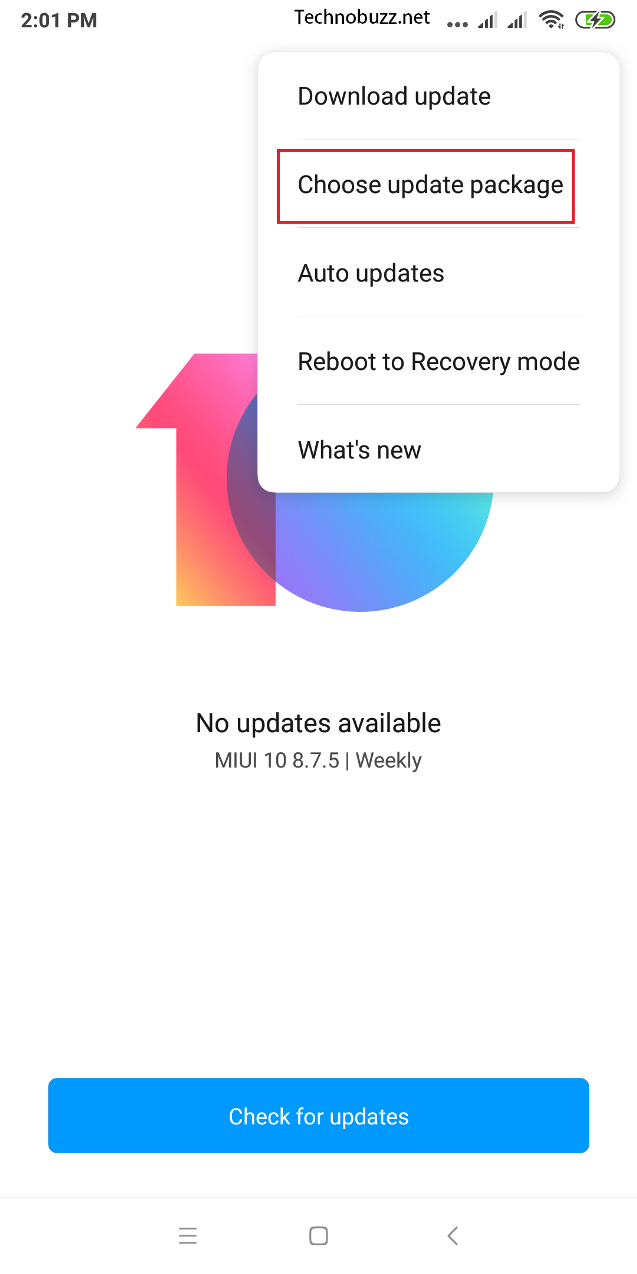
3. Now on your phone open Settings > About phone > System Update and Tap on the three dots from above and select the option Choose Update Package. See the screenshot below.
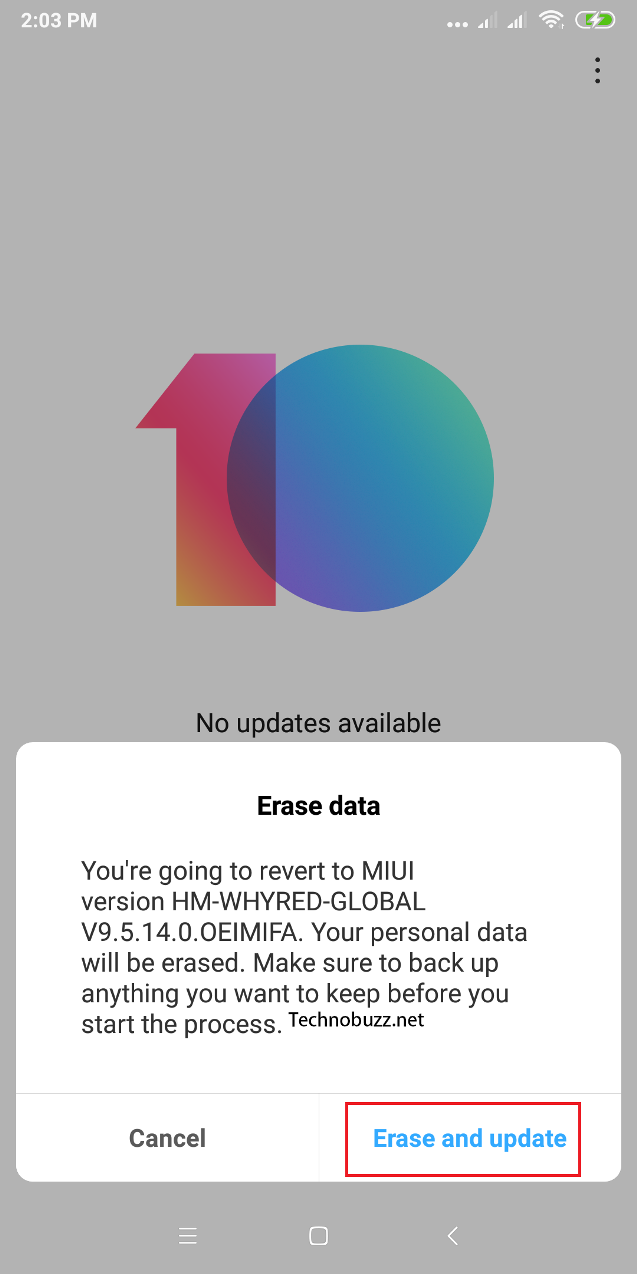
4. Now from here choose the MIUI 9 recovery zip file and select OK to start the flashing process. Now you will see the warning on your phone “Erase Data“. Tap on it and the installation process will start on your phone.
5. Now your phone will reboot and the installation process will start. This process will take 5 to 10 minutes.
6. Once the MIUI 9 is successfully installed on your phone, your phone boot automatically.



कोई टिप्पणी नहीं:
एक टिप्पणी भेजें